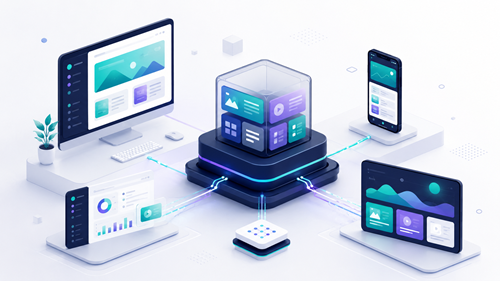
Organizations rarely operate through a single website anymore. Customers may interact with a company through corporate websites, mobile applications, customer portals, digital displays, e-commerce platforms, email campaigns, and other connected experiences.
A traditional content management system can effectively support a primary website, but distributing the same content across multiple channels often requires duplicate work or custom integrations. A fully headless CMS solves the delivery problem by making content available through APIs, but it can also remove the visual editing and page-management tools that marketing teams rely on.
A hybrid headless CMS provides a middle path. It supports traditional website management and visual editing while also allowing structured content to be delivered through APIs to applications and other channels.
This guide explains how hybrid headless architecture works, how it differs from decoupled and fully headless systems, the technical tradeoffs involved, and how to determine whether it is the right model for your organization.
Table of Contents
- What Is a Hybrid Headless CMS?
- Traditional vs. Decoupled vs. Headless vs. Hybrid CMS
- Hybrid Headless vs. Decoupled CMS
- Benefits of Hybrid Headless Architecture
- Technical Tradeoffs to Consider
- How to Decide Whether Hybrid Headless Is Right for Your Business
- Xperience by Kentico and Optimizely Examples
- Representative Hybrid Headless Scenario
- A Phased Migration Plan
- Frequently Asked Questions
- Choosing the Right CMS Architecture
What Is a Hybrid Headless CMS?
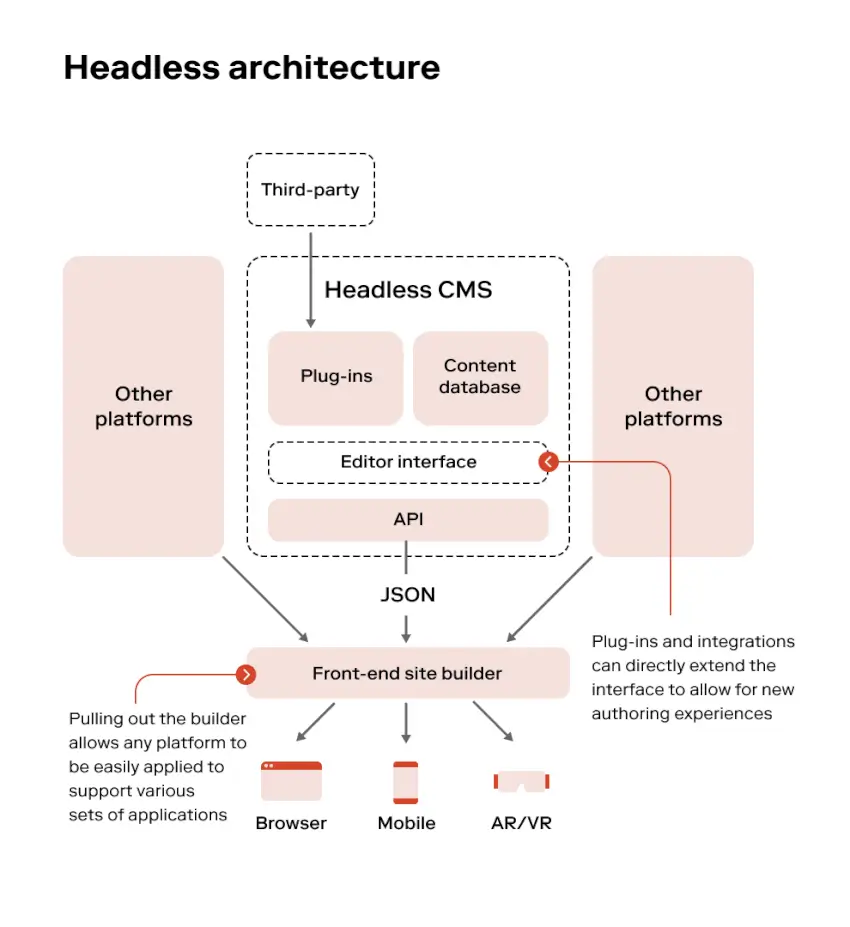
A hybrid headless CMS combines two approaches to managing and delivering content:
- Traditional website capabilities, including page management, templates, visual editing, workflows, forms, navigation, and previews
- Headless content delivery through APIs for mobile applications, portals, kiosks, single-page applications, digital signage, and other channels
Content teams can continue building and managing website pages through familiar editorial tools. At the same time, developers can model reusable content—such as products, locations, articles, team members, promotions, or technical specifications—and retrieve that content through APIs.
The organization does not have to make every experience headless. Each channel can use the delivery model that best fits its requirements.
For example:
- The corporate website can use CMS-managed templates and visual page-building tools.
- A mobile application can retrieve structured content through GraphQL.
- A customer portal can combine CMS content with information from a CRM or ERP.
- Digital displays can retrieve approved promotions and product information through an API.
- Email campaigns can reuse content stored in a central content hub.
This selective approach is the defining characteristic of hybrid headless architecture.
Traditional vs. Decoupled vs. Headless vs. Hybrid CMS
The terms traditional, decoupled, headless, and hybrid are sometimes used interchangeably, but they represent different architectural choices.
Traditional CMS
- How presentation works
- The CMS manages content, templates, rendering, and delivery.
- Editorial experience
- Strong page-editing and preview capabilities.
- API delivery
- Usually limited or secondary.
- Primary advantage
- Simplicity and an integrated website-management experience.
- Primary limitation
- Content and presentation can be tightly connected.
- Best suited for
- Organizations primarily managing one or more conventional websites.
Decoupled CMS
- How presentation works
- The CMS manages content while a separate presentation application renders it.
- Editorial experience
- May retain page-management and preview tools.
- API delivery
- Content is sent to a defined frontend through an API.
- Primary advantage
- Separates application delivery from content management.
- Primary limitation
- The architecture may still assume one primary frontend.
- Best suited for
- Organizations modernizing a website frontend without requiring broad omnichannel delivery.
Fully Headless CMS
- How presentation works
- The CMS stores structured content but does not provide a built-in presentation layer.
- Editorial experience
- Content-focused editing; visual page composition may be limited or implemented separately.
- API delivery
- API delivery is the primary model.
- Primary advantage
- Maximum frontend and channel flexibility.
- Primary limitation
- Greater development responsibility and fewer out-of-the-box page-management capabilities.
- Best suited for
- Digitally mature organizations with multiple custom applications and strong development resources.
Hybrid Headless CMS
- How presentation works
- The CMS supports managed websites and API-driven experiences.
- Editorial experience
- Visual website editing combined with structured, multichannel content.
- API delivery
- APIs serve selected content and channels.
- Primary advantage
- Flexibility without requiring every experience to become headless.
- Primary limitation
- Teams must govern two delivery models and their integrations.
- Best suited for
- Organizations that need strong marketing tools and selective omnichannel delivery.
No architecture is automatically better than the others. The right choice depends on the experiences being delivered, the needs of content editors, the available technical resources, and the organization’s long-term roadmap.
For a broader look at CMS selection criteria, read our guide on how to choose the right CMS.
Hybrid Headless vs. Decoupled CMS
A decoupled CMS separates the content-management backend from a specific frontend application. Content may be retrieved through an API, but the system is commonly designed around one primary presentation layer, such as a React or Next.js website.
A hybrid headless CMS supports both coupled and headless delivery models within the same content ecosystem.
The distinction becomes clearer when considering how each architecture grows.
With a decoupled implementation, an organization might replace its CMS-rendered website with a separate frontend while continuing to use the CMS for content management. The frontend and CMS are separated, but the project may still be fundamentally website-oriented.
With a hybrid headless implementation, the organization can retain a CMS-managed website while selectively delivering structured content to additional channels. Marketing landing pages may continue using visual editing, while product information is reused across the website, mobile application, customer portal, and sales tools.
A simple way to distinguish them is:
- Decoupled CMS: One primary frontend is separated from the CMS.
- Fully headless CMS: Every presentation layer is external to the CMS.
- Hybrid headless CMS: The organization can use both CMS-managed and external presentation layers.
This flexibility allows businesses to modernize incrementally instead of rebuilding every digital experience at once.
Benefits of Hybrid Headless Architecture
Preserve the Marketing Team’s Editorial Experience
Marketers often need to create landing pages, arrange components, preview responsive layouts, manage forms, schedule campaigns, and personalize content without waiting for a deployment.
A fully headless implementation can reproduce these capabilities, but doing so may require additional development and integration. Hybrid platforms retain visual website-management capabilities for the experiences that benefit from them.
Reuse Content Across Channels
Structured content can be created once and delivered wherever it is needed.
A product record, for example, might include:
- Product name and description
- Technical specifications
- Images and downloadable documents
- Regulatory information
- Related services
- Languages and regional variations
That content can then support a website, mobile application, distributor portal, product catalog, or digital display without being recreated separately for each channel.
Modernize Gradually
Hybrid headless architecture does not require an all-at-once migration. Organizations can begin with a conventional website and introduce API delivery for one channel or content domain.
A controlled rollout reduces risk, gives teams time to refine their content model, and creates opportunities to demonstrate value before expanding the architecture.
Give Developers Greater Frontend Flexibility
Developers can select the frameworks and delivery patterns appropriate for each channel. A mobile application does not need to inherit website templates, and a customer portal can combine CMS content with authenticated business data.
This independence can also allow frontend teams to deploy application updates without redeploying the CMS, provided that the API contract remains compatible.
Centralize Content Governance
A shared content platform can apply common workflows, permissions, localization rules, retention requirements, and publishing standards across channels.
Without a central system, different applications may develop separate content stores, approval processes, and versions of the same information. Hybrid headless architecture can reduce that fragmentation.
Avoid Unnecessary Architectural Complexity
Not every page needs to be delivered through an API. A conventional marketing page may be faster and less expensive to implement with the CMS’s existing page tools.
Hybrid architecture lets teams apply headless delivery where it produces measurable value instead of making it a mandatory technical standard.
Learn more about the broader benefits of headless CMS platforms.
Technical Tradeoffs to Consider
Hybrid headless provides flexibility, but it does not eliminate architectural complexity. It changes where that complexity must be managed.
Previewing Draft Content
Traditional CMS preview usually occurs inside the same system that renders the page. Headless content must be previewed through the consuming application.
The preview implementation may need to:
- Retrieve draft rather than published content
- Authenticate preview requests securely
- Route editors to the appropriate screen or page
- Prevent draft content from being cached publicly
- Display content in the correct language and channel
- Preserve the editor’s context when moving between the CMS and frontend
Preview should be designed early. Treating it as a final enhancement can leave editors with an experience that is technically functional but difficult to use.
Caching and Content Freshness
API-delivered content may pass through application caches, content delivery networks, edge caches, or static-generation processes.
Teams must decide:
- How long content can remain cached
- Which content requires immediate invalidation
- Whether publishing triggers a webhook or rebuild
- How referenced content updates propagate
- What happens when the content API is temporarily unavailable
- Whether stale content can safely be served during an outage
Aggressive caching can improve performance and resilience, but poor invalidation rules can cause different channels to display inconsistent information.
Search
A traditional CMS website may use a built-in or integrated search index. Headless applications often need a separate search strategy.
The search implementation must account for:
- Structured content and page content
- Multiple languages
- Draft versus published versions
- Security-trimmed results
- Content relationships
- Facets and filters
- Index updates after publishing
- Search across CMS, product, document, or commerce data
Teams should determine whether the CMS search capability, a content graph, or an external service will be the authoritative search layer.
Authentication and Authorization
Content APIs, editorial previews, customer portals, and public applications have different security requirements.
API keys intended for server-to-server use should not be exposed in browser or mobile application code. A backend-for-frontend or secure proxy may be needed to protect credentials and enforce authorization.
Authenticated customer data should also remain separate from publicly reusable CMS content. The frontend can combine the two sources after verifying the user’s identity and permissions.
Analytics, Consent, and Personalization
Traditional CMS integrations may automatically record page views, form submissions, campaign activity, and personalization signals. Headless channels often require explicit tracking implementations.
Teams need consistent rules for:
- User and session identification
- Consent enforcement
- Event naming
- Campaign attribution
- Cross-domain and cross-application measurement
- Personalization decisions
- Data retention
- Analytics testing
If each frontend implements tracking differently, reports may become difficult to compare and customer journeys may become fragmented.
Deployment Coordination
Separating the CMS and frontend allows independent releases, but it introduces dependencies between systems.
A content-model or API change can affect several applications. Teams should use:
- Versioned or backward-compatible content models
- Contract testing
- Defined deprecation periods
- Coordinated release procedures
- Automated integration tests
- Environment-specific API configuration
- Rollback plans
Independent deployment is valuable only when teams also manage the contracts connecting those deployments.
API Governance
As more applications consume content, the API becomes a shared organizational product.
Governance should define:
- Who owns each content type
- Which fields are required
- Naming and localization standards
- API-key management and rotation
- Rate limits and usage monitoring
- Schema-change approvals
- Deprecation policies
- Documentation responsibilities
- Data-classification restrictions
Without governance, reusable content models can become cluttered with channel-specific fields and undocumented dependencies.
Frontend Maintenance
A headless architecture shifts more responsibility to frontend teams. Every custom application needs ongoing attention for:
- Framework and dependency upgrades
- Security patches
- Accessibility
- SEO and metadata
- Component libraries
- Browser and device compatibility
- Monitoring
- Performance
- Automated testing
The ability to choose any frontend technology is valuable, but each additional technology creates another application lifecycle to manage.
How to Decide Whether Hybrid Headless Is Right for Your Business
Use the following six decision areas to determine which CMS architecture best matches your organization.
1. Number and Type of Digital Channels
Traditional CMS may be sufficient when:
Your organization primarily delivers content through one or more conventional websites.
Hybrid headless becomes attractive when:
Your websites must coexist with mobile applications, customer portals, kiosks, digital displays, or other API-driven channels.
Fully headless may fit when:
Almost every customer experience uses a custom frontend and content must be delivered primarily through APIs.
2. Development Resources
Traditional CMS may be sufficient when:
Your team relies on the CMS to provide most of the website's templates, components, forms, navigation, and presentation functionality.
Hybrid headless becomes attractive when:
Developers can support selected custom applications while the CMS continues managing standard websites and marketing experiences.
Fully headless may fit when:
Dedicated product and development teams can build, test, deploy, and maintain every presentation layer.
3. Editorial Requirements
Traditional CMS may be sufficient when:
Editors primarily create pages using templates, widgets, components, and visual page-building tools.
Hybrid headless becomes attractive when:
Editors need visual website-management tools as well as structured content that can be reused across applications and other channels.
Fully headless may fit when:
Editors primarily manage structured content, and the organization is prepared to build or integrate the required preview and page-composition capabilities.
4. Integrations
Traditional CMS may be sufficient when:
The website has a limited number of straightforward integrations, and most content originates in the CMS.
Hybrid headless becomes attractive when:
Multiple channels need to combine CMS content with information from CRM, ERP, commerce, product information, search, or document-management systems.
Fully headless may fit when:
Your organization already operates an API-first ecosystem in which many independent applications consume shared services and data.
5. Budget and Operating Costs
Traditional CMS may be sufficient when:
The primary objective is minimizing initial development effort and ongoing application-management costs.
Hybrid headless becomes attractive when:
Your organization can invest incrementally in custom channels where content reuse, faster delivery, or reduced duplication creates measurable value.
Fully headless may fit when:
The organization can fund custom frontends, hosting, integrations, preview tools, monitoring, deployment automation, and long-term application maintenance.
6. Governance and Ownership
Traditional CMS may be sufficient when:
One centralized web or marketing team owns most content, publishing, and website decisions.
Hybrid headless becomes attractive when:
Marketing, product, regional, compliance, and technology teams share content and can establish clear ownership, workflows, and API-governance standards.
Fully headless may fit when:
Mature platform governance already exists across multiple product teams, applications, and independently deployed frontends.
Interpreting Your Results
Hybrid headless is often a strong fit when your organization repeatedly answers “both.” You need a high-quality marketing website and visual editing tools, but you also need reusable content and custom delivery for selected digital channels.
Hybrid headless may not be the right choice when:
-
Your organization only needs a straightforward website.
-
There is no development team available to maintain API-driven applications.
-
Content is unlikely to be reused outside the primary website.
-
Ownership and governance are not mature enough to support shared content models.
-
The expected business benefits do not justify the additional implementation and operating costs.
Hybrid headless is often a strong fit when the answer is “both.” The business needs a high-quality marketing website and visual editing, but it also needs reusable content and custom delivery for selected channels.
It may not be the right choice when:
- The organization only needs a straightforward website.
- There is no development team to maintain API-driven applications.
- Content is unlikely to be reused outside the website.
- Governance and ownership are not mature enough to manage shared content models.
- The expected benefits do not justify the additional implementation and operating costs.
Architecture should follow genuine business requirements, not industry terminology.
Xperience by Kentico and Optimizely Examples
Xperience by Kentico
Xperience by Kentico is designed as a hybrid headless digital experience platform.
An organization can use website channels and Page Builder for visually managed web experiences while maintaining reusable structured content in the Content Hub. Headless channels expose content through GraphQL endpoints for applications, external websites, single-page applications, and other consumers.
A possible implementation could include:
- Page Builder for the corporate website and campaign landing pages
- Reusable product, location, event, and article content in the Content Hub
- A headless channel for a mobile application
- A separate headless channel for a distributor portal
- Published-content API access for production
- Draft-content access for a protected preview environment
- Centralized workflows, permissions, localization, and content governance
This gives marketers a familiar website-building experience without preventing developers from using structured content in other channels.
Optimizely
Optimizely CMS can also support hybrid delivery.
Its page-oriented CMS capabilities can manage conventional web experiences, while multi-channel content can be maintained separately from the standard page tree. Optimizely Graph provides a GraphQL-based content query and delivery layer that can make CMS content available to custom applications.
A hybrid implementation might use:
- Optimizely page and block editing for the primary website
- Multi-channel content for reusable product or campaign information
- Optimizely Graph for delivery to a mobile application or JavaScript frontend
- Draft and published content synchronization for preview and production
- Search and filtering through the content graph
- Structured rich-text delivery for non-web channels
- Preview tokens and a custom preview URL for headless editing
The architectural decision is not simply Kentico versus Optimizely. It is how each platform’s editing, delivery, experimentation, personalization, deployment, and governance capabilities align with the organization’s operating model.
Explore additional trends in our review of modern CMS advancements.
Representative Hybrid Headless Scenario
The following composite scenario illustrates a realistic hybrid headless implementation pattern. It is not presented as a specific client engagement or as a claim of measured client results.
The Business Situation
A multi-division industrial manufacturer operates:
- A corporate website
- Four product-brand websites
- A distributor portal
- A mobile application used by field representatives
- Product data stored in an ERP
- Customer and lead information stored in a CRM
- Technical documents maintained across several file repositories
The marketing team needs control over website pages, campaigns, case studies, news, and regional content. Product teams need technical specifications to remain consistent across websites, the portal, and the mobile application.
The organization’s existing CMS works well for standard website pages, but product descriptions and documents are copied into multiple systems. Updates take too long, and different channels occasionally display inconsistent information.
A fully headless rebuild would give developers maximum flexibility, but it would require replacing the marketing team’s visual editing process and rebuilding several website features that already work.
The Hybrid Approach
Moonstone recommends retaining CMS-managed presentation for the corporate and product websites while introducing structured content and API delivery for information shared across channels.
The content model includes:
- Products
- Product families
- Technical specifications
- Industries
- Case studies
- Locations
- Contacts
- Documents
- Compliance notices
- Regional variations
Marketing pages continue using templates and visual components. Editors can assemble campaign and service pages without a development release.
Product content is managed centrally and related to the appropriate pages. The same approved product information is delivered through APIs to the distributor portal and field application.
ERP data remains authoritative for operational values such as inventory identifiers and product status. The CMS owns customer-facing descriptions, media, related resources, and marketing classifications. The frontend combines those sources according to clearly defined ownership rules.
Technical Design
The implementation uses:
- Server-rendered CMS pages for the public websites
- Structured reusable content for products and supporting resources
- A GraphQL content API for the distributor portal and mobile application
- A backend proxy to protect API credentials
- CDN caching for published public content
- Event-driven cache invalidation after publishing
- A protected preview frontend for draft API content
- A shared search index combining CMS and product information
- Centralized analytics event names across the website, portal, and application
- Single sign-on for authenticated distributor experiences
- Automated contract tests for the content API
The team also creates a governance group with representatives from marketing, product, technology, and compliance. The group owns content-model changes, required fields, publishing workflows, and API deprecation decisions.
Practical Outcome
This architecture allows the organization to:
- Preserve visual editing for marketing teams
- Reduce duplicate product-content entry
- Deliver more consistent information across channels
- Modernize one experience at a time
- Add future API consumers without rebuilding the primary website
- Maintain clear ownership between CMS, ERP, and CRM data
- Avoid the cost and disruption of an unnecessary full-headless migration
The scenario demonstrates the central value of hybrid headless architecture: apply API-first delivery where it solves a real problem while retaining integrated CMS capabilities where they remain effective.
A Phased Migration Plan
A hybrid transition should be treated as a business and content initiative, not only a frontend-development project.
Phase 1: Define Objectives and Establish a Baseline
Document:
- Current channels and audiences
- Existing content sources
- Duplicate publishing processes
- Editorial pain points
- Integration dependencies
- Performance and availability requirements
- Current conversion and engagement metrics
- Security and compliance requirements
Identify the specific business problem that headless delivery is expected to solve.
Phase 2: Audit and Model Reusable Content
Separate reusable information from page-specific presentation.
Define content types, relationships, taxonomies, localization rules, ownership, and validation requirements. Avoid reproducing existing pages as large unstructured API records.
A durable content model should describe what the content means rather than how one frontend displays it.
Phase 3: Select a Focused Pilot
Choose one meaningful but manageable use case, such as:
- A mobile application content feed
- A product catalog
- A location directory
- A customer portal resource center
- Digital signage
- A campaign-content service
The pilot should demonstrate reuse without placing a mission-critical experience at unnecessary risk.
Phase 4: Build the Delivery Foundation
Implement the shared capabilities that future channels will need:
- API security
- Preview
- Caching
- Search
- Monitoring
- Analytics
- Consent
- Error handling
- Content fallbacks
- Contract testing
- Deployment automation
This foundation matters more than the choice of frontend framework.
Phase 5: Migrate Selectively
Move content and channels when the benefits justify the work. Keep conventional pages in the CMS when visual management remains the best fit.
Avoid turning the migration into a requirement that every page or component become headless.
Phase 6: Measure, Govern, and Expand
Compare the implementation with the baseline established in Phase 1.
Evaluate:
- Publishing time
- Duplicate content reduction
- Content consistency
- API performance
- Application reliability
- Editorial satisfaction
- Development effort
- Conversion and engagement
- Operating cost
Use the results to decide whether to expand, revise, or stop the headless rollout.
Frequently Asked Questions
What is a hybrid headless CMS?
A hybrid headless CMS supports both traditional website management and API-based content delivery. Teams can visually manage website pages while also delivering structured content to mobile applications, portals, kiosks, and other channels.
What is the difference between hybrid and decoupled CMS?
A decoupled CMS generally separates the CMS from one defined frontend. A hybrid headless CMS supports CMS-managed websites and multiple API-driven channels within the same content ecosystem.
Is hybrid headless the same as fully headless?
No. In a fully headless architecture, every frontend is built outside the CMS. A hybrid model allows some experiences to use CMS templates and page-building tools while other experiences consume content through APIs.
Does a hybrid headless CMS improve website performance?
It can, but the architecture alone does not guarantee faster performance. Results depend on frontend rendering, API efficiency, image optimization, caching, CDN configuration, search, third-party scripts, and infrastructure.
A poorly designed headless frontend can perform worse than a well-optimized traditional CMS website.
Is hybrid headless better for SEO?
Hybrid headless can support strong SEO, but custom frontends must correctly implement server-side rendering or static generation, canonical URLs, metadata, structured data, redirects, sitemaps, internal links, and status codes.
CMS-rendered pages may require less custom SEO engineering because many of these capabilities are already integrated.
Is hybrid headless more expensive?
It is generally more complex than managing a single traditional website because the organization must maintain APIs, integrations, preview environments, and custom frontends.
However, selective adoption can be more cost-effective than a full-headless rebuild. The business case improves when content reuse, faster channel launches, or reduced duplication offsets the additional platform and development costs.
Which organizations benefit most from hybrid headless?
Hybrid headless is often a good fit for organizations that:
- Operate multiple websites or brands
- Need mobile applications, portals, or digital displays
- Reuse content across channels
- Have both marketing and product-development teams
- Need integrations with commerce, CRM, ERP, or product systems
- Want to modernize incrementally
- Require strong workflows and governance
Can an existing traditional CMS be migrated gradually?
Yes, provided the platform supports structured content and API delivery or can integrate with an appropriate content service.
A common approach is to retain the existing website, model one reusable content domain, and introduce API delivery for a single new channel. Additional experiences can migrate after the organization validates the model.
Do Xperience by Kentico and Optimizely support hybrid headless delivery?
Yes. Xperience by Kentico supports website channels, reusable Content Hub items, and GraphQL-based headless channels. Optimizely supports page-oriented CMS experiences, multi-channel content, and GraphQL delivery through Optimizely Graph.
The implementation details, licensing, hosting, and supporting features should be evaluated against the organization’s requirements.
Choosing the Right CMS Architecture
Hybrid headless architecture is valuable because it avoids forcing every digital experience into the same delivery model.
Marketing teams can retain visual tools for building websites and campaigns. Developers can use APIs where custom applications require greater flexibility. Organizations can reuse governed content across channels and modernize without committing to a disruptive all-at-once rebuild.
The architecture is not automatically the best choice for every business. It succeeds when the organization has a clear multichannel requirement, a sustainable content model, appropriate development resources, and governance that keeps systems aligned.
Moonstone Interactive helps organizations evaluate CMS architecture, model reusable content, plan integrations, and implement digital experiences using platforms such as Xperience by Kentico, Optimizely, and WordPress.
Explore Moonstone Interactive’s content management services or contact our team to discuss the right architecture for your organization.